
Simple Random Walk Definition#
Introduction to Simple Random Walk#
A simple random walk \( X_n \) is a fundamental concept in probability theory and stochastic processes. It describes a path where each step taken depends randomly on whether the previous step was positive or negative. Starting from an initial value \( a \), the process moves step by step, with each step increasing or decreasing by 1 with probabilities \( p \) and \( 1 - p \) respectively.
The evolution of \( X_n \) is governed by the accumulation of these random increments or decrements, making it a versatile model for various real-world phenomena such as financial markets, biological systems, and more.
A simple random walk \( X_n \) is a discrete-time stochastic process defined by the following rules:
\( X_0 = a \), where \( a \) is a constant initial value.
For \( n \geq 1 \),
\[ X_n = a + \sum_{i=1}^{n} Z_i, \]where \( Z_i \) are independent random variables defined as:
\[\begin{split} Z_i = \begin{cases} 1, & \text{with probability } p \\ -1, & \text{with probability } q = 1 - p \end{cases} \end{split}\]
In this definition:
\( p \) is the probability of moving to the next step positively.
\( q = 1 - p \) is the probability of moving to the next step negatively.
The values \( Z_i \) represent the increments or decrements taken at each step \( n \), contributing to the path \( X_n \) of the random walk.
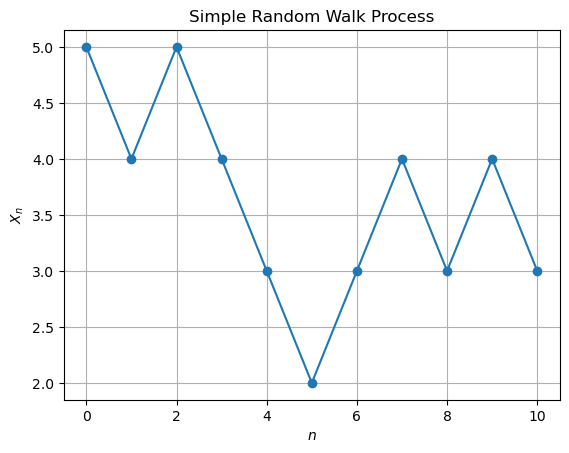
We will simulate this process by flipping a coin to determine the values of \(Z_i\) and then record the output for \(Z_i\) and \(X_n\) in a table form for \(n = 0\) to \(10\) with \(a = 5\).
import random

# Parameters
a = 5
n_steps = 10
p = 0.5  # Probability of Z_i being 1
q = 1 - p  # Probability of Z_i being -1

# Initialize the process
X = [a]
Z = []

# Simulate the random walk
for n in range(1, n_steps + 1):
    Z_i = 1 if random.random() < p else -1
    Z.append(Z_i)
    X.append(X[-1] + Z_i)

# Output the results
print(f"{'n':>2} {'Z_i':>4} {'X_n':>4}")
print(f"{'0':>2} {'-':>4} {X[0]:>4}")
for i in range(1, n_steps + 1):
    print(f"{i:>2} {Z[i-1]:>4} {X[i]:>4}")

# Visualize the process
plt.plot(range(n_steps + 1), X, marker='o')
plt.title('Simple Random Walk Process')
plt.xlabel('$n$')
plt.ylabel('$X_n$')
plt.grid(True)
plt.show()
import random
import matplotlib.pyplot as plt


# Parameters
a = 5
n_steps = 10
p = 0.5  # Probability of Z_i being 1
q = 1 - p  # Probability of Z_i being -1

# Initialize the process
X = [a]
Z = []

# Simulate the random walk
for n in range(1, n_steps + 1):
    Z_i = 1 if random.random() < p else -1
    Z.append(Z_i)
    X.append(X[-1] + Z_i)

# Output the results
print(f"{'n':>2} {'Z_i':>4} {'X_n':>4}")
print(f"{'0':>2} {'-':>4} {X[0]:>4}")
for i in range(1, n_steps + 1):
    print(f"{i:>2} {Z[i-1]:>4} {X[i]:>4}")

# Visualize the process
plt.plot(range(n_steps + 1), X, marker='o')
plt.title('Simple Random Walk Process')
plt.xlabel('$n$')
plt.ylabel('$X_n$')
plt.grid(True)
plt.show()
 n  Z_i  X_n
 0    -    5
 1   -1    4
 2    1    5
 3   -1    4
 4   -1    3
 5   -1    2
 6    1    3
 7    1    4
 8   -1    3
 9    1    4
10   -1    3
f"{'n':>1} {'Z_i':>4} {'X_n':>4}"
'n Z_i X_n'
Generating a Sample Path of Simple Random Walk in Python#
To simulate and visualize a sample path of a simple random walk in Python, you can follow these steps using NumPy:
Import Required Libraries:
import numpy as np
import matplotlib.pyplot as plt
Set Parameters:
Define the parameters for the random walk:
np.random.seed(42)  # Setting a random seed for reproducibility
n_steps = 100  # Number of steps in the random walk
p = 0.5  # Probability of moving positively
initial_value = 0  # Starting value of the walk
Generate Random Steps
Create an array of random steps \(Z_i\) using NumPy’s random module:
steps = np.random.choice([-1, 1], size=n_steps, p=[1 - p, p])
Compute the Random Walk Path
Calculate the cumulative sum to get the path $X_n%:
path = np.cumsum(np.insert(steps, 0, initial_value))
Plot the Random Walk
Visualize the generated path using Matplotlib:
plt.figure(figsize=(10, 6))
plt.plot(path, marker='o', linestyle='-')
plt.title('Sample Path of Simple Random Walk')
plt.xlabel('Steps')
plt.ylabel('Value')
plt.grid(True)
plt.show()
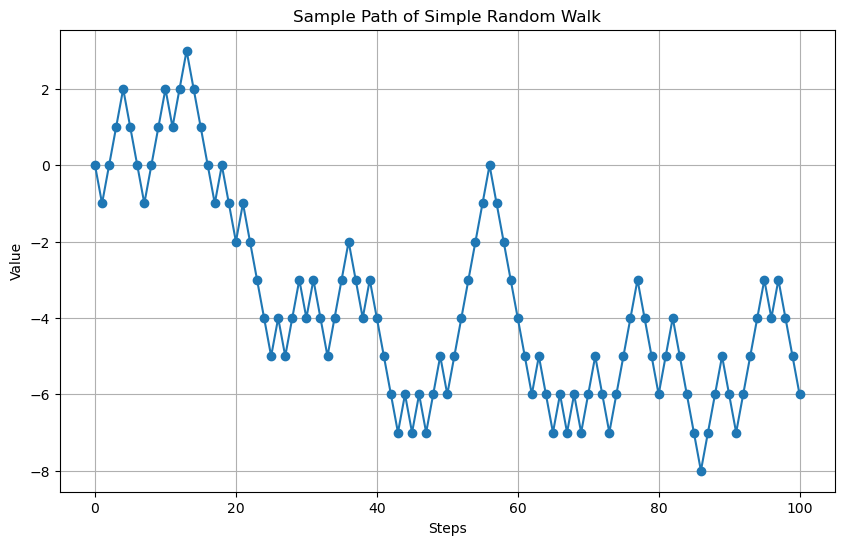
Result: Sample Path of Simple Random Walk
Running the above code will generate and display a sample path of a simple random walk:
plt.figure(figsize=(10, 6))
plt.plot(path, marker='o', linestyle='-')
plt.title('Sample Path of Simple Random Walk')
plt.xlabel('Steps')
plt.ylabel('Value')
plt.grid(True)
plt.show()
## Simple Random Walk Simulation in Python

import numpy as np
import matplotlib.pyplot as plt

# Set parameters
np.random.seed(42)  # Setting a random seed for reproducibility
n_steps = 100  # Number of steps in the random walk
p = 0.5  # Probability of moving positively
initial_value = 0  # Starting value of the walk

# Generate random steps
steps = np.random.choice([-1, 1], size=n_steps, p=[1 - p, p])

# Compute the random walk path
path = np.cumsum(np.insert(steps, 0, initial_value))

# Plot the random walk
plt.figure(figsize=(10, 6))
plt.plot(path, marker='o', linestyle='-')
plt.title('Sample Path of Simple Random Walk')
plt.xlabel('Steps')
plt.ylabel('Value')
plt.grid(True)
plt.show()
Generating Multiple Sample Paths of Simple Random Walk in Python#
To simulate and visualize multiple sample paths of a simple random walk in Python, you can follow these steps using NumPy:
Import Required Libraries:
import numpy as np
import matplotlib.pyplot as plt
Set Parameters:
Define the parameters for the random walk:
np.random.seed(42)  # Setting a random seed for reproducibility
n_steps = 100  # Number of steps in each random walk
n_paths = 10  # Number of sample paths
p = 0.5  # Probability of moving positively
initial_value = 0  # Starting value of the walk
Generate Random Steps for Multiple Paths
Create an array of random steps \(Z_i\) for multiple paths using NumPy’s random module:
steps = np.random.choice([-1, 1], size=(n_paths, n_steps), p=[1 - p, p])
Compute the Random Walk Paths
Calculate the cumulative sum to get the paths \(X_n\) for each sample path:
paths = np.cumsum(np.insert(steps, 0, initial_value, axis=1), axis=1)
Plot the Random Walks
Visualize the generated paths using Matplotlib:
plt.figure(figsize=(12, 8))
for i in range(n_paths):
    plt.plot(paths[i], marker='o', linestyle='-', alpha=0.7, label=f'Path {i+1}')
plt.title('Multiple Sample Paths of Simple Random Walk')
plt.xlabel('Steps')
plt.ylabel('Value')
plt.legend()
plt.grid(True)
plt.show()
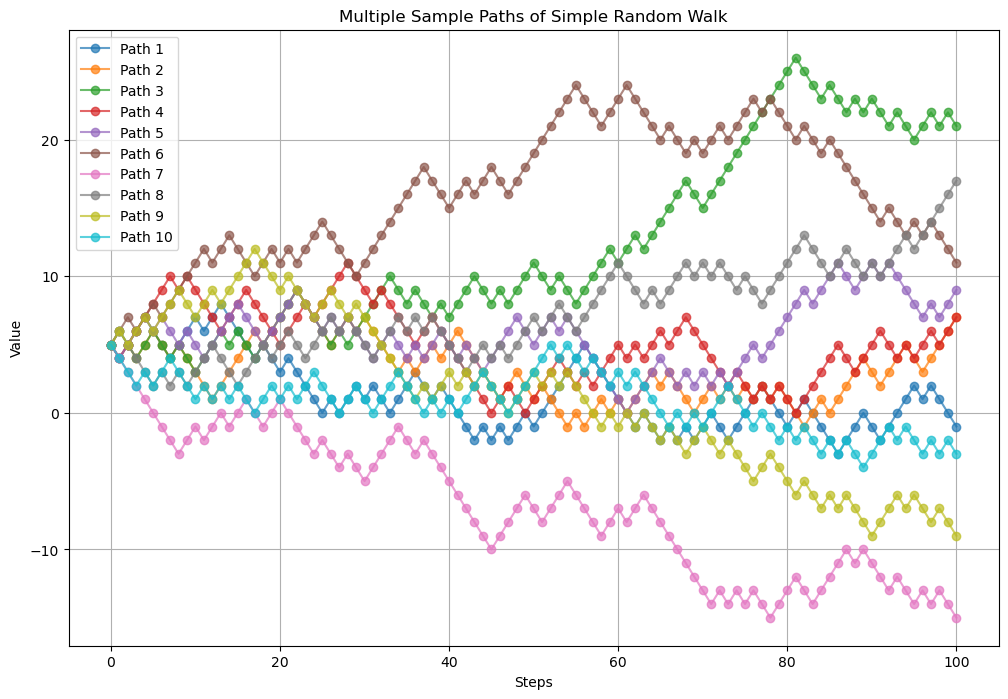
Result: Multiple Sample Paths of Simple Random Walk
Running the above code will generate and display 10 sample paths of a simple random walk.
import numpy as np
import matplotlib.pyplot as plt

# Set Parameters
np.random.seed(42)  # Setting a random seed for reproducibility
n_steps = 100  # Number of steps in each random walk
n_paths = 10  # Number of sample paths
p = 0.5  # Probability of moving positively
initial_value = 5  # Starting value of the walk

# Generate Random Steps for Multiple Paths
steps = np.random.choice([-1, 1], size=(n_paths, n_steps), p=[1 - p, p])

# Compute the Random Walk Paths
paths = np.cumsum(np.insert(steps, 0, initial_value, axis=1), axis=1)

# Plot the Random Walks
plt.figure(figsize=(12, 8))
for i in range(n_paths):
    plt.plot(paths[i], marker='o', linestyle='-', alpha=0.7, label=f'Path {i+1}')
plt.title('Multiple Sample Paths of Simple Random Walk')
plt.xlabel('Steps')
plt.ylabel('Value')
plt.legend()
plt.grid(True)
plt.show()

# Result: Multiple Sample Paths of Simple Random Walk
print(paths)
[[ 5  4  5 ...  1  0 -1]
 [ 5  4  5 ...  5  6  7]
 [ 5  6  5 ... 21 22 21]
 ...
 [ 5  6  5 ... 15 16 17]
 [ 5  6  5 ... -7 -8 -9]
 [ 5  4  3 ... -3 -2 -3]]
Exercise: Modeling Coffee Bean Prices with Random Walk
Coffee bean prices are known to fluctuate based on various market factors. Suppose we model the daily price of coffee beans using a random walk process with the following parameters:
Probability of moving positively (\(p\)): \(0.6\)
Initial price (\(a\)): \(100\) (hypothetical starting price in dollars)
Size of increments: \(0.5\) (representing daily price fluctuations in dollars)
Define the random walk process for the daily price of coffee beans, \(X_n\).
Simulate and compute the price of coffee beans for the first 10 days.
Plot the simulated price path using Matplotlib.
Instructions:
Implement the random walk process using Python.
Display the simulated price path in a clear and readable format.
Discuss the implications of the chosen parameters (\(p\), \(a\), increment size) on the volatility and trend of coffee bean prices.
Use Monte Carlo methods to estimate the expected price at day 10 and estimate the probability that is greater than \(102\).
Solution: Modeling Coffee Bean Prices with Random Walk
Define the random walk process:
Coffee bean price \(X_n\) is defined as:
\[\begin{split} X_0 = 100 \\ X_n = X_{n-1} + Z_n \end{split}\]
where
Simulate and compute the price for the first 10 days:
Using Python, simulate the daily prices based on the defined process.
import numpy as np
import matplotlib.pyplot as plt

np.random.seed(42)

# Parameters
n_days = 10
p = 0.6
increment = 0.5
initial_price = 100

# Generate random steps
steps = np.random.choice([increment, -increment], size=n_days, p=[p, 1-p])

# Compute price path
price_path = np.cumsum(np.insert(steps, 0, 0)) + initial_price

# Print the price path
print(f"{'Day':<4} {'Price ($)':<10}")
for day in range(n_days + 1):
    print(f"{day:<4} {price_path[day]:<10.2f}")

# Plot the price path
plt.figure(figsize=(10, 6))
plt.plot(range(n_days + 1), price_path, marker='o', linestyle='-', color='b')
plt.title('Daily Price of Coffee Beans')
plt.xlabel('Day')
plt.ylabel('Price ($)')
plt.grid(True)
plt.show()